Pocket Option Trading Tools: What You Should Be Using

Facts Checked by Shahwaiz Khan
Back when I first opened an account on Pocket Option, I was all over the place. Clicking buttons, adding indicators I didn’t understand, and chasing trades without a solid plan. I thought the platform alone would make me profits. But it took several losses and a few sleepless nights before I realized something: tools matter. The right tools, used the right way, make all the difference.
This article isn’t just another breakdown of what indicators Pocket Option offers. You can find that in their help center. I’ll take you inside my personal trading setup, show you what most traders miss, and walk you through the exact mix of tools that helped me go from random trades to strategic execution.
Pocket Option trading tools include built-in indicators, multiple chart types, flexible timeframes, drawing tools, trading signals, and external platforms such as TradingView and economic calendars. For most traders, the most effective combination is TradingView for analysis, Pocket Option’s built-in indicators for execution, and a trading journal for continuous improvement. This guide explains which tools are worth using, how to combine them, and which ones to avoid.
What Are Pocket Option Trading Tools?
Pocket Option trading tools are features and third-party resources that help traders analyze price movements, identify trading opportunities, manage risk, and improve decision-making. They include built-in technical indicators, chart types, drawing tools, market signals, economic calendars, and external platforms such as TradingView.
Why Tools Make or Break Your Pocket Option Strategy
When you’re trading short timeframes—especially 1-minute or 5-minute trades—you don’t have time to second-guess. You need confirmation. You need a plan. And you need tools that make decisions easier, not harder. The built-in charting tools are a great start, but if you’re relying only on those, you’re leaving money on the table.
Let’s break it down.
Ready to put these tools to the test? Create your free Pocket Option account and start using the built-in indicators, chart types, and quick execution features that can transform how you trade.
Quick Comparison of Pocket Option Trading Tools
| Tool | Best For | Beginner Friendly | Free |
|---|---|---|---|
| EMA | Trend direction | ✅ | ✅ |
| RSI | Momentum | ✅ | ✅ |
| Bollinger Bands | Volatility | ✅ | ✅ |
| MACD | Trend confirmation | Intermediate | ✅ |
| TradingView | Advanced charting | ✅ | Free plan |
| Economic Calendar | Avoid news volatility | ✅ | ✅ |
| Trading Journal | Performance review | ✅ | ✅ |
Built-In Pocket Option Charting Tools (And How to Actually Use Them)
Pocket Option comes with a range of technical tools. They’re simple but powerful—if you use them right.
1. Indicators
Here’s what I personally use out of Pocket Option’s default list:
- Bollinger Bands – Great for spotting volatility and overbought/oversold levels. I set the period to 20 and the deviation to 2. Watch how price hugs the bands before reversals.
- RSI (Relative Strength Index) – I use a 7-period setting instead of the default 14. It gives quicker signals for binary options. Look for divergence, not just overbought/oversold zones.
- Moving Average (EMA) – I layer two EMAs: 5 and 13. Their crossover gives me quick trend confirmation.
- MACD – Not just for trends. I use MACD histogram momentum to judge entry strength. Rising histogram = good confirmation.
- Fractals – A simple tool for support/resistance. Add them and zoom out. You’ll start seeing price respect these points.
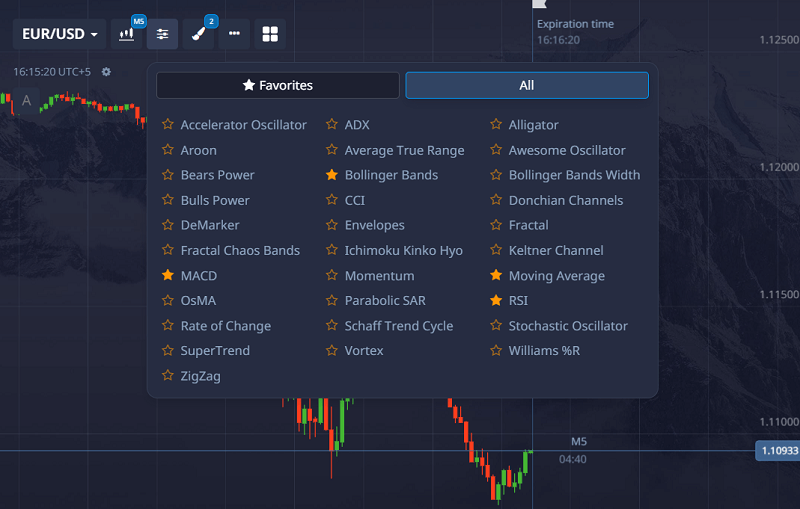
Most traders just turn them on and wait for a signal. But that’s not trading—that’s gambling. The trading hack is to combine them.
Here’s how I do it:
- Use the EMA cross as a base trend direction.
- Wait for RSI divergence or reversal signal.
- Confirm with the MACD histogram momentum.
- Check Bollinger Bands for squeeze or breakout pattern.
- Use Fractals for placing entry/exit points.
2. Chart Types
Pocket Option offers several chart types: Line, Candlestick, Area, Heiken Ashi, and Bar.
- Candlestick: My default. Shows market sentiment clearly.
- Heiken Ashi: I switch to this during trending markets. It smooths out noise.
- Bar chart: Great for scalping. Easier to spot quick reversals.
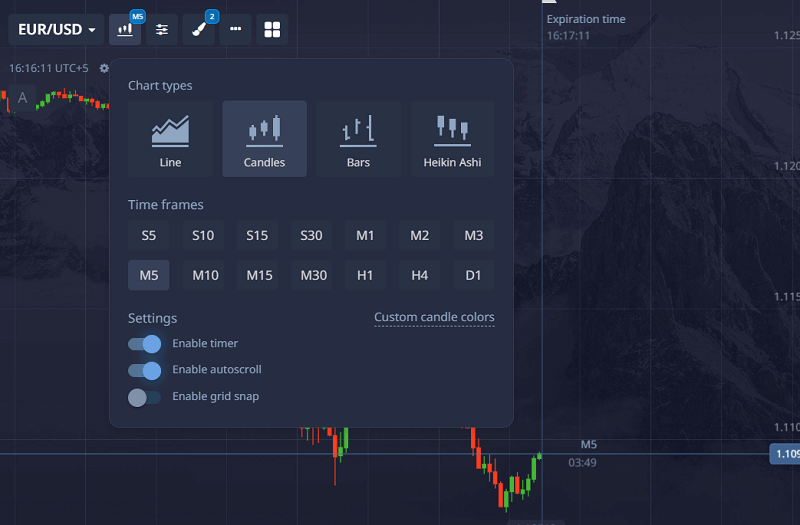
Tip: Switch between them while analyzing. Candlesticks for setup, Heiken Ashi for confirmation.
3. Timeframes
For binary options, the most useful timeframes are:
- 1 minute for fast scalping.
- 5 minutes for mid-range setups.
- 15 minutes for strong trend confirmation.
What I do: Analyze for 5 minutes, enter for 1-minute. Always zoom out to the 15M chart once a day to check market context.
Drawing Tools Worth Using
Instead of relying only on indicators, I spend most of my analysis drawing levels.
I typically use:
- Horizontal Support & Resistance
- Trendlines
- Fibonacci Retracement
- Price Channels
These tools don’t repaint and often provide cleaner entry zones than oscillators.
Risk Management Tools You Shouldn’t Ignore
No indicator can compensate for poor discipline.
My trading routine always includes:
- Position sizing calculator
- Daily loss limit
- Session timer
- Trading journal
- Economic calendar
These tools protect your account more than any indicator.
External Tools That Give You an Edge
Most people ignore external tools, thinking Pocket Option is “enough.” It’s not. These tools helped me go from 50/50 wins to consistently above 70%.
1. TradingView (Free Version Works Fine)
Hands down, the best charting platform out there. Use it to:
- Analyze clean charts without the clutter.
- Draw precise support/resistance zones.
- Create alerts for patterns or price levels.
- Spot divergence more easily than on Pocket Option.
I mark key levels on TradingView, then return to Pocket Option to place trades.
Bonus: You can use indicators like TDI, Supertrend, or custom RSI-MACD combos that aren’t available on Pocket Option.
2. Economic Calendar (Investing.com or ForexFactory)
I learned the hard way: never trade right before major news. These sites give you daily calendars showing:
- Which economic news events are coming?
- What currency or asset will they affect?
- The expected volatility.
Tip: Avoid trading 15 minutes before and after red-folder news events. Market gets wild.
3. Signal Providers (Only Use as Confirmation)
I don’t rely on them. But I use tools like:
- Autochartist
- Pocket Option’s built-in Signals tab
- Trading Central
Treat these like another opinion. Don’t follow them blindly.
4. Screen Recording Software (OBS Studio)
This changed everything for me. I record my sessions. Then review them afterwards. Helps me catch patterns in my behavior, like revenge trading or ignoring signals.
5. Notebook or Notion Template
Keep a journal. Write:
- Why did you take the trade
- What tools did you use
- What went right or wrong
After 50 trades, you’ll see patterns emerge. Mine was overtrading during lunchtime hours. I fixed it by only trading during the London and New York open.
Pair your TradingView insights with live trading setups inside Pocket Option. Join Pocket Option now and unlock a platform where smart tools meet fast decisions.
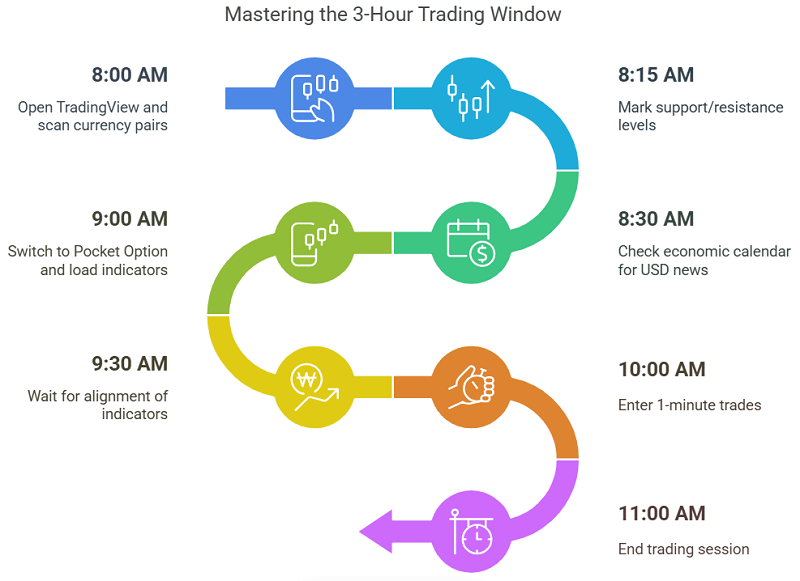
Real-Life Use Case: My 3-Hour Trading Window
Let me show you what an average session looks like.
Time: 8:00 AM to 11:00 AM (New York Session open)
- Open TradingView. Scan EUR/USD, GBP/USD, and USD/JPY.
- Mark support/resistance. Check for any clean trends or ranging behavior.
- Check the economic calendar. Avoid trading during USD news periods.
- Switch to Pocket Option. Load EMA, RSI, MACD, and Bollinger.
- Wait for alignment:
- Price pulls back to the EMA zone
- RSI shows bullish divergence
- MACD histogram rising
- Price near support with previous bullish candle
- Enter a 1-minute trade in the direction of the setup.
I take 5–7 trades per session. If I win 4 or more, I stop. No chasing losses.
Common Mistakes with Trading Tools (And How I Avoided Them)
- Using too many indicators: Clutter creates confusion. Stick to 3–4 max.
- Not testing settings: Default values aren’t always best. Test RSI at 7, EMA at 5/13.
- Ignoring context: Tools don’t work the same in every market. A ranging market kills trend indicators.
- Not syncing analysis: Use TradingView and Pocket Option side by side. Match your levels.
Best Tool Combination for Beginners
If you’re just starting, don’t overload your charts.
I recommend:
- EMA (13)
- RSI (7)
- Candlestick chart
- TradingView Free
- Economic Calendar
Master these before experimenting with advanced indicators.
Best Tool Combination for Experienced Traders
Once you’re comfortable with the basics, add:
- Multi-timeframe analysis
- MACD Histogram
- Fibonacci
- Market Structure
- Trading Journal
- Correlation Analysis
The goal isn’t using more tools, it’s combining complementary ones.
How to Choose the Right Trading Tools
Choose tools based on your strategy rather than popularity.
- Scalpers benefit from fast indicators like EMA and RSI.
- Swing traders rely more on trendlines and higher timeframes.
- News traders need an economic calendar.
- Beginners should prioritize simplicity over complexity.
What Most Traders Miss (That I Learned the Hard Way)
This part isn’t talked about enough.
- Market Phases Matter: Are you in accumulation, markup, distribution, or markdown? Use volume and price structure to judge. Most indicators work better in certain phases.
- Psychological Tools: Ever used a countdown timer to stop overtrading? Try it. Or limit your trades to 3 a day. It improves quality.
- Correlation Tools: Use websites like Mataf.net to check asset correlation. If EUR/USD and GBP/USD are both bullish, you get double confirmation.
FAQs About Pocket Option Trading Tools
What are the best tools for Pocket Option?
The best combo includes EMA (5,13), RSI (7), MACD, and Bollinger Bands. Add TradingView for deeper analysis.
Are Pocket Option indicators reliable?
Pocket Option indicators are reliable when combined with price action, support and resistance, and market context. No indicator predicts price perfectly, but combining trend, momentum, and volatility indicators improves trade confirmation and reduces false signals.
Can I use TradingView with Pocket Option?
Yes. Use it to mark levels, analyze trends, and create alerts. Then trade based on that on Pocket Option.
Is there a tool to auto trade on Pocket Option?
Pocket Option allows bots and signal-based EAs via their API, but use caution. Manual trading with tools offers more control.
What’s the best chart type for Pocket Option?
Candlesticks are the most detailed. Heiken Ashi is smoother for trend-following.
How many indicators should I use?
Three to four. More than that, and signals get mixed. Use tools that complement each other.
When should I avoid using tools?
During high-impact news, low volume hours (like lunch time), or sideways markets.
Final Thoughts: Tools Are Your Trading Allies
When I stopped treating tools like magic and started treating them like filters, everything changed. Each tool is a lens to view the market. The more in sync they are, the clearer the trade becomes.
If you’re just clicking around Pocket Option and hoping to hit green, you’re wasting time. But if you combine the built-in tools with external ones, log your trades, and stick to a system, you give yourself a real edge.
This post isn’t theory. It’s what I actually do, every day, I trade.
Don’t just study trading tools—use them where it counts. Start trading on Pocket Option and apply your strategy with confidence using real-time data, smart indicators, and flexible timeframes.
Join BeCoin Premium
Stop trading blind. BeCoin Premium brings you in-depth market analysis, real trade setups, and a community of traders who take this seriously. Your simple platform does the execution. We do the thinking with you.