How to Withdraw Money from Pocket Option to a Crypto Wallet (Step-by-Step)
Facts Checked by Shahwaiz Khan
Withdrawing profits from Pocket Option to a crypto wallet is a straightforward process once your account is verified. You’ll need to choose a supported cryptocurrency, enter the correct wallet address, confirm the request by email, and wait for the transaction to be processed. While crypto withdrawals are often faster than traditional bank transfers, the actual time depends on account verification, blockchain network activity, and Pocket Option’s internal review process. In this guide, I’ll explain the entire process, common mistakes to avoid, and practical tips that have made my own withdrawals smoother and more reliable.
In this guide, I’ll walk you through the exact steps I use to withdraw my earnings from Pocket Option to my crypto wallet. I’ll show you screenshots, real proof of transactions, and even compare crypto withdrawals with traditional bank options. If you’re tired of delayed payouts or confusing processes, keep reading.
Pocket Option Crypto Withdrawal at a Glance
| Feature | Information |
|---|---|
| Verification Required | Yes |
| Wallet Needed | Yes |
| Supported Assets | BTC, USDT, ETH, LTC and other supported cryptocurrencies |
| Minimum Withdrawal | Depends on the selected cryptocurrency |
| Processing Time | Varies based on verification and blockchain activity |
| Email Confirmation | Required |
What Is a Pocket Option Crypto Withdrawal?
A Pocket Option crypto withdrawal is the process of transferring your trading profits from your Pocket Option account to a personal cryptocurrency wallet. Instead of using traditional banking methods, the withdrawal is completed over a blockchain network such as Bitcoin, Ethereum, or TRON. This approach is popular because it offers global accessibility, continuous availability, and often faster settlement than conventional payment methods.
Why I Prefer Crypto Withdrawals Over Bank Transfers
Before we jump into the how-to, here’s why I switched to crypto withdrawals:
- Speed: Most crypto withdrawals from Pocket Option hit my wallet within 10–20 minutes.
- Lower Fees: Banks usually charge a flat fee or take a cut in exchange rates. With crypto, the network fee is often much cheaper.
- No Middlemen: With crypto, there’s no bank to approve, delay, or question your transaction.
- Global Access: I can withdraw from anywhere, even while traveling.
Let’s break it down with a quick comparison:
| Feature | Crypto Wallet | Bank Transfer |
|---|---|---|
| Typical Processing | Usually faster, depending on blockchain activity | Usually several business days |
| Availability | 24/7 blockchain network | Banking hours |
| Fees | Blockchain network fees may apply | Bank and intermediary fees may apply |
| Global Access | High | Depends on banking availability |
| Tracking | Blockchain transaction ID | Bank reference number |
Want lightning-fast payouts like this? Sign up with Pocket Option and link your crypto wallet today, skip the delays and start withdrawing in under 30 minutes.
Which Cryptocurrencies Can You Withdraw?
Pocket Option periodically supports withdrawals through several cryptocurrencies, including:
- Bitcoin (BTC)
- Tether (USDT)
- Ethereum (ETH)
- Litecoin (LTC)
- TRON (TRX)
Available options may vary depending on your account and region, so always check the Finance section before requesting a withdrawal.
Step-by-Step: Pocket Option Crypto Withdrawal Process
This is the exact method I follow, using Bitcoin as the example. The steps are the same for USDT, ETH, LTC, and other coins available.
Step 1: Make Sure Your Account is Verified
You can’t withdraw without verifying your Pocket Option account. Here’s how I did it:
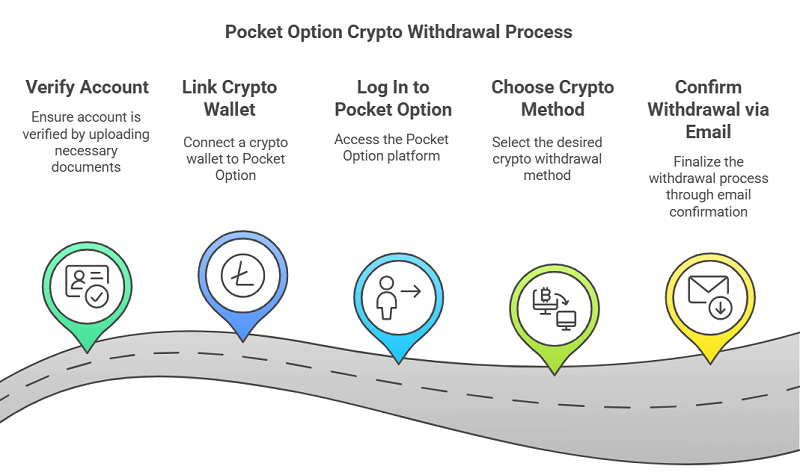
- Go to your Profile > Verification.
- Upload a photo ID (passport or driver’s license).
- Upload proof of address (bank statement or utility bill).
- Wait for approval, mine took 3 hours.
Step 2: Link Your Crypto Wallet
You need to have a wallet ready. I use Trust Wallet and Binance, depending on the coin.
- Open your crypto wallet.
- Choose the coin you want to use (e.g., Bitcoin).
- Click Receive and copy your wallet address.
Open your preferred cryptocurrency wallet and select the same cryptocurrency you plan to withdraw from Pocket Option. Tap Receive to generate your wallet address, then carefully copy it. Before continuing, verify both the wallet address and the blockchain network (such as Bitcoin, TRC20, or ERC20). Using the wrong network may result in permanent loss of funds.
Important: Make sure the address you copy matches the coin you’re withdrawing. Never send Bitcoin to a USDT wallet.
Step 3: Log In to Pocket Option
- Go to Pocket Option and log in.
- Click on the Finance tab at the top.
- Choose Withdrawal.
Step 4: Choose the Crypto Method
- You’ll see a list of options. Choose Bitcoin, Ethereum, Tether, or your preferred coin.
- Enter the amount you want to withdraw.
- Paste your crypto wallet address.
- Confirm the withdrawal.
Pocket Option will show a summary. Double-check the address. If you make a mistake here, your funds could be lost forever.
Step 5: Choose the Correct Blockchain Network
Many traders accidentally select the wrong blockchain network when withdrawing cryptocurrencies like USDT.
For example:
- USDT TRC20
- USDT ERC20
- USDT BEP20
Although the currency name is the same, each network uses different addresses and transaction methods.
Always ensure the withdrawal network matches the wallet receiving the funds.
Step 6: Confirm the Withdrawal via Email
You’ll get an email from Pocket Option to confirm the transaction.
- Open your email and find the confirmation message.
- After submitting the withdrawal request, Pocket Option sends a confirmation email for security purposes. Open the email immediately and click the confirmation link. Your withdrawal request will remain pending until this confirmation is completed.
Without this step, your withdrawal won’t be processed.
Followed all the steps but still unsure? Open a Pocket Option account now and get a 50% bonus on your first deposit, plus access to fast, crypto-based withdrawals from day one.
Real Transaction Proof
Here’s a screenshot of one of my Bitcoin payouts:
- Date: April 16, 2025
- Amount: $92.90
- Time Requested: 09:02 AM
- Time Received in Wallet: 10:09 AM
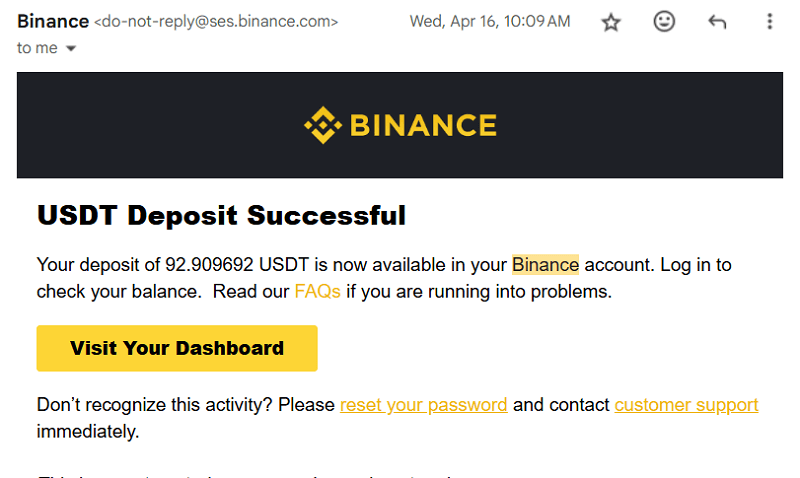
During this withdrawal, I submitted the request, confirmed it by email, and then monitored the blockchain transaction until it reached my wallet. Watching the confirmation process helped me understand that delays often occur on the blockchain itself rather than inside Pocket Option.
How to Track Your Withdrawal
Once your withdrawal has been approved, you may receive a blockchain transaction ID (TXID).
You can use this ID to monitor your transfer on a blockchain explorer.
Tracking the transaction lets you see:
- Confirmation status
- Processing progress
- Final wallet delivery
This is useful when network congestion causes delays.
Common Issues and How to Fix Them
Withdrawal Stuck on “Processing”
Sometimes withdrawals take longer due to:
- Network congestion (common with Ethereum)
- Verification not complete
- Wallet address errors
Fix: Check email confirmation and make sure your address is correct. If it takes more than 2 hours, contact live support.
Withdrawal Rejected
This usually happens if:
- You’re using a different method than the one you deposited with
- You haven’t completed identity verification
- You made multiple requests too quickly
Fix: Always withdraw using the same method as your deposit at least once. After that, you can switch.
How Much Can You Withdraw via Crypto?
I’ve tested small and large withdrawals:
- Minimum $10 for most crypto methods
- Maximum Up to $10,000 per day (based on account level)
Tip: For larger withdrawals, split them into 2–3 transactions to avoid delays.
Hidden Tips Most Traders Don’t Know
Use Low-Fee Coins Like Litecoin or Tron
Bitcoin and Ethereum sometimes have high gas fees. I often use Litecoin or TRC20 USDT, which have faster processing and cheaper fees.
Withdraw During Off-Peak Hours
Network congestion affects speed. I found that crypto withdrawals are faster in the early morning (3–6 AM UTC).
Save Wallet Addresses for Future Use
Pocket Option allows you to save addresses. I label mine by coin and platform (e.g., BTC Trust Wallet).
Never Withdraw Directly to Exchange Wallets
Some exchanges (like Coinbase) reject certain transactions. Always send to your personal wallet first, then transfer to an exchange if needed.
Security Tips Before Every Withdrawal
Before confirming your withdrawal, I always follow this checklist:
- Verify the wallet address twice.
- Confirm the blockchain network.
- Enable two-factor authentication.
- Start with a small withdrawal if using a new wallet.
- Save the transaction ID until the funds arrive.
These simple steps help reduce mistakes that can permanently affect crypto transfers.
FAQs about Pocket Option Crypto Withdrawal
How long does Pocket Option take to send crypto?
Most withdrawals are processed within 1–2 hours. Crypto usually arrives in your wallet within 30 minutes.
Is there a fee for withdrawing crypto from Pocket Option?
Pocket Option doesn’t charge a withdrawal fee, but you pay the blockchain network fee (varies by coin).
Can I withdraw profits using a different method than I deposited?
You need to first withdraw using the same method you used for depositing. After that, you can switch methods.
Can I withdraw to any crypto wallet?
Yes, as long as it supports the coin and network. Just double-check you’re using the correct address.
Do I need to complete KYC to withdraw?
Yes. Before you can make your first withdrawal from Pocket Option, you must complete the identity verification process.
What is the minimum withdrawal?
It’s usually $10 for crypto methods, but it varies slightly based on the coin.
Can I withdraw on weekends?
Yes. Crypto withdrawals work 24/7, including weekends and holidays.
Which crypto is best for Pocket Option withdrawals?
Many traders prefer USDT (TRC20) because it generally offers lower network fees and faster confirmation times than Bitcoin or Ethereum. However, the best choice depends on your preferred wallet, local availability, and current blockchain conditions.
Final Thoughts: Why I’ll Stick with Crypto Withdrawals
Withdrawing profits to a crypto wallet has become my preferred option because it offers flexibility and direct control over my funds. However, speed alone shouldn’t be your only priority. Taking a few extra minutes to verify your account, confirm the correct blockchain network, and double-check your wallet address can prevent costly mistakes. Once you establish a consistent withdrawal process, moving your trading profits becomes much simpler and more predictable.
Don’t let your profits sit idle. Join Pocket Option, verify your account, and experience the freedom of 24/7 crypto withdrawals, where your money actually moves at your pace.
Join BeCoin Premium
Stop trading blind. BeCoin Premium brings you in-depth market analysis, real trade setups, and a community of traders who take this seriously. Your simple platform does the execution. We do the thinking with you.